Pull up a chair and grap the popcorn! It’s eWallet for iPhone: The Movie! We know people are dying to get their hands on eWallet for iPhone but we’re still waiting on Apple!* In the meantime, we put together this short (about 1 minute, 40 seconds) demo video for you so that you can see the new software in action! Enjoy!
The movies are in Quicktime format (seemed appropriate considering it’s for an Apple product) and are provided in three different resolutions for your viewing pleasure!
\* “What’s the hold up?” you ask. While we aren’t entirely sure, it looks like it has something to do with export approval. As most of your know our 256-bit AES encryption is exteremly powerful - so powerful, in fact, that we have to get a variety of government approvals to export eWallet (yep - an eWallet program so powerful exporting it to the wrong people is a potential security threat!) So anyhow, Apple has told us that it should be in the store by the 11th so we’re still hoping to make the “It’s Out!” announcement tomorrow!
We’re not trying to be cagey with iPhone info about our apps - there still are a lot of unknowns. We hope we’ll have eWallet in the iPhone App store Friday, but we haven’t yet seen confirmation of that. We want to send reviewers copies as soon as we can, but we’re not quite sure when the mechanisms will be in place. We’re not sure if we’ll have a way to give existing users a discount on the iPhone purchases, but we do have a plan in place to be sure they’re taken care of.
Sorry! We wish we had more definite info as much as anyone does! It all looks very exciting from the previews (here’s one), but we’re still a little in the dark.
And, on a non-iPhone topic, today’s funniest mobile-related headine was: Former Virgin And NBC Exec Turns VC. MocoNews is my favorite source for info, Tricia Duryee’s articles are great, and I know what the headline meant, but maybe “Former NBC and Virgin Exec” would have been a better choice.
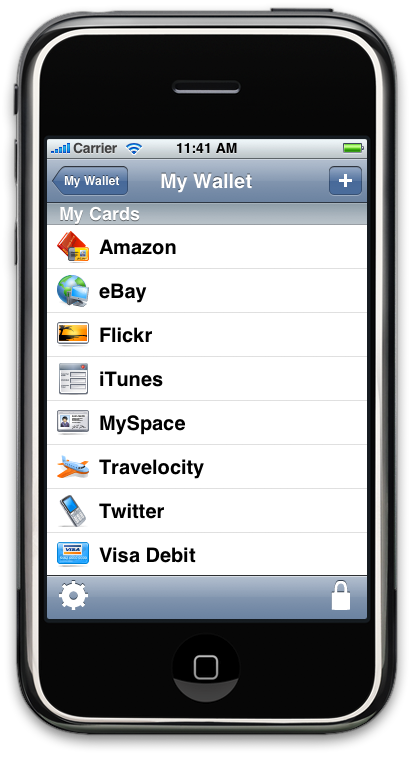
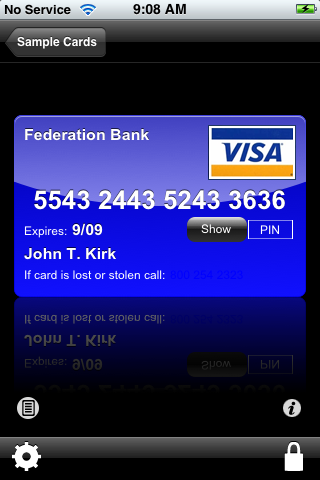
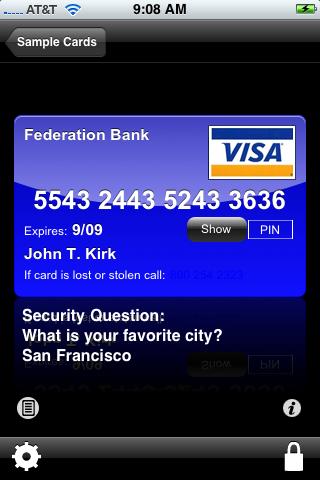
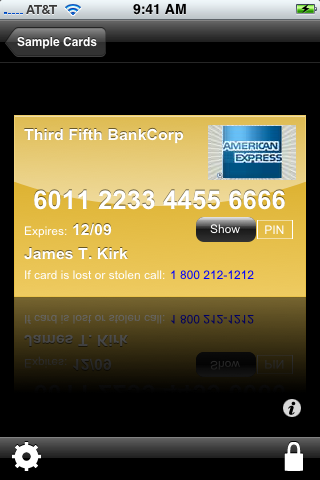
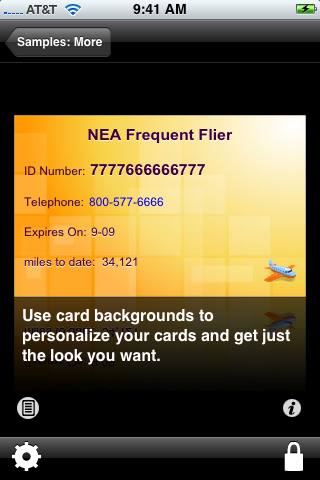
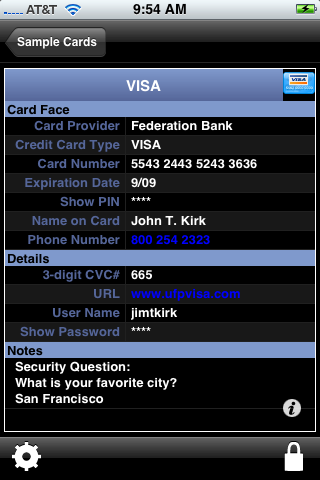
With the (predicted) AppStore release date swiftly approaching, I wanted to take a second to give you a sneak peak at eWallet for iPhone. I am extremely excited about this application. It looks great, it’s easy to use, and while we’ve captured the iPhone feel it is in every way the eWallet software you’ve come to know and love.
Of course this will generate the usual question:
“When will it be released?”
We hope to see it available in the AppStore around the time that the AppStore goes live but we don’t know exactly when eWallet will be available. First, as far as I understand it, no one is 100% sure when the AppStore will go live. Second, we don’t have control over the process used to post applications. We send Apple the application, they look it over, decide if it is “fit for the AppStore” and then put the application out there for the public. This whole process happens according to Apple’s timetable.
What I can tell you is that we have a finished product (I’ve been using it on my own iPhone for some time now) and we’re ready to roll as soon as Apple gives us the go ahead! So watch this space! We’ll definitely make some noise the minute the software is available!
Click on any thumbnail below to see the full image!
More and more of the analysts and commentators are starting to realize predict that the coming iPhone Application Store will be as revolutionary for third-party software sales as the iPhone has been for smartphones.
Despite the analysts’ bad track record for mobile market predictions in general, I think they’re right about this one. There will be a huge advantage to having the App Store on the device, supported by the maker of the device and the OS.
Microsoft and Palm have been missing this for years. They’ve relied completely on third-party stores. There’s been no major advertising of the availability of software for Palm or Windows Mobile phones. There’s been very little promotional activity, and not much effort to raise users’ awareness of the fact that they can buy software.
Apple’s already changed this, and the store’s still 3 weeks away. Friends and relatives who have had only the vaguest idea what we do are asking whether our software will run on the iPhone. Articles about third-party software for the iPhone turn up regularly in my tech and business news feeds. There’s a link to App Store info on the front page of iphone.com. Major companies, including eBay, Electronic Arts, and Sega, have already announced and demonstrated their iPhone apps.
It’s going to be a whole new world for mobile software developers. Our biggest problem has always been that people just don’t know they can add software to their PDAs and smartphones. I’m convinced that Apple will solve this for us.
I know this does’t mean that our jobs will suddenly get easy - they won’t. There will be a lot more competition. It’s a very new market for us. And there are a huge number of open issues about the App Store, beginning with whether our apps will even get into it. Trial versions, upgrades, user info for support: it’s pretty clear that Apple hasn’t given any of these much time yet.
But I’m still optimistic that Apple’s monopoly on third-party distribution will be better for developers than the current mobile software distribution oligopoly. No matter how much I like some of the distributors, they’re not doing, and never have done, what the mobile market needs. And neither have the mobile hardware and operating system OEMs. Apple may end up helping them all as well - just raising user awareness of the availability of add-on software might improve software sales on other mobile platforms as well. But I’d bet that the distributors who haven’t already thrown in the towel are pretty nervous right now. Apple’s marketing, combined with the fact that they’re behind the software store, the OS and the hardware, is going to be very powerful.
I know there’s a lot of disagreement among developers about this, and I admit I’m uncomfortable with the idea that without Apple’s approval, we literally won’t be able to sell software for the iPhone. But the mobile software market badly needs a big change. I don’t know where we’ll be a year from now, but I’m pretty sure it will be a very different place. I’m all in favor of that.
And here are a few articles of the articles from this morning and last week:
*oligopoly: a market condition in which sellers are so few that the actions of any one of them will materially affect price and have a measurable impact on competitors
Yes, the iPod Touch is very easy to use right out of the box. But I’ve been frustrated, both by the on-screen keyboard and by using it as an mp3 player while I was walking. And I thought - it’s supposed to be easy to use; I must be missing something. So I poked around, and found some slightly hidden features that really helped.
I figured everyone else knew these already, so wasn’t going to publish them, but it turned out that wasn’t true, at least around here. So in case anyone else might benefit from them, here are the 6 most useful things I’ve learned about using an iPhone or iPod Touch. In the tradition of top 10 lists everywhere, they’re in reverse order, so you might want to read bottom-up if you’re impatient.
Update: the 2.0 version of the iPhone and iPod Touch software changed some of these. I’ve made a few changes, below. And I’ve put all the tips here, as well, which I may be a little better about maintaining.
6 - Hold and double-tap gestures are recognized and useful in several places. I won’t list them here, but try holding your finger, or double-tapping, on a screen where you want more options. For example, holding the N on the keyboard gives you Ń and Ñ as well as N. On iPhone and iPod Touch 2.0, holding the .COM key gives you .NET and .ORG options, though not on the earlier OS. It’s probably worth upgrading just for that. And I believe that holding down the period key when entering an email address also gives you those options, but I can’t verify that until my iPod Touch comes back.
5 - Tapping space twice in a row on the main keyboard will put “. " (that is, period space) into your input.
4 - If you’re frustrated because your VOIP voice messages show up as .WAV files in your email, and your iPod touch can’t play them, you can send them through iphoneconvert, and you’ll be able to hear them right on your iPod touch. OR get the iPhone 2.0 software upgrade, and they’ll play automatically.
3 - To quickly add a punctuation or number key without changing keyboards, tapping the key, and changing back, you can instead drag your finger from the .?123 key to the key you want. This will insert that character, and change the keyboard right back to the alpha keyboard. Also, tapping the space key after most characters on the punctuation/number keyboard will send you directly back to the alpha keyboard as well.
2 - If you’ve having trouble getting the screen to change orientation, be sure you’re holding your iPhone perpendicular to the ground, rather than flat. That one’s saving me 3 or 4 swear words a day. Thanks, Marc.
1 - Double-clicking the Home button on an iPod Touch brings up a music controller, with volume, play/pause, next and previous buttons, that you can use without unlocking the device. This is extremely useful - it means I don’t have to turn it on, unlock it, and wiggle it until the screen is vertical just to change the volume or skip a song. I realize it’s less useful on the iPhones (it does work on the iPhone too, but only when you’re playing music; otherwise it brings up Contacts), that have hardware controls for music, but for me, it fixes what had been my biggest frustration about using the iPod Touch for mp3s.
Except for the one about how to hold the Touch to get the screen to change, these were all published on the internet, so many thanks to everyone who put them up originally.
Cleaning out my Big Drawer of Geeky T-Shirts (the new one that came out of my recent Google visit just refused to fit), I ran across my original Newton Developers’ Conference t-shirt. I’m pretty sure there was only the one conference, and yes, I was there. As the shirt says:
A smart step for Newton.
A giant leap in technology.
And a long time ago.
I think that if Apple pulls off the iPhone/iPod Touch third-party apps the way they might (and I know that’s an “if”, not a given), they’ll do what they tried to do 15 years ago with the Newton - make a PDA that’s really mainstream. And, no,
I don’t think that exists right now. I see a lot of people with some kind of mobile device, but as far as I can tell, they’re primarily checking email, messages and websites. The majority of mobile users aren’t using most of the features, capacity and power of their devices.
What’s different? Quite a bit, including how much better technology is now than 15 years ago, and that the market’s in a very different state. Michael Mace wrote, several weeks ago: that
An elegant business model paired with mediocre technology beats an elegant technology paired with a mediocre business model.
and I think that the difference between the way Newton and iPhone hit the streets is a great illustration of that.
Apple’s learned a lot. I say: good for them. Many companies don’t. Here’s one opinion of the mistakes Apple made with Newton, and the critical difference between what they did then and what they do now.
Now if they could only make the iPhone commercials as good as the oldNewtonones (those are 3 separate links) were.
 Pull up a chair and grap the popcorn! It’s eWallet for iPhone: The Movie! We know people are dying to get their hands on eWallet for iPhone but we’re still waiting on Apple!* In the meantime, we put together this short (about 1 minute, 40 seconds) demo video for you so that you can see the new software in action! Enjoy!
 We’re not trying to be cagey with iPhone info about our apps - there still are a lot of unknowns. We hope we’ll have eWallet in the iPhone App store Friday, but we haven’t yet seen confirmation of that. We want to send reviewers copies as soon as we can, but we’re not quite sure when the mechanisms will be in place. We’re not sure if we’ll have a way to give existing users a discount on the iPhone purchases, but we do have a plan in place to be sure they’re taken care of.

 Yes, the iPod Touch is very easy to use right out of the box. But I’ve been frustrated, both by the on-screen keyboard and by using it as an mp3 player while I was walking. And I thought - it’s supposed to be easy to use; I must be missing something. So I poked around, and found some slightly hidden features that really helped.
