It’s semi-official! Windows Mobile 6 (aka Crossbow) is here (sort of)! The good news is that all the latest versions of Ilium Software’s products are 100% compatible with the new versions of the OS. We’ve been working with Crossbow for a few months now and tested all of our latest releases. From eWallet and ListPro to NewsBreak, Keep Track, and DockWare Pro, your apps will continue to work great on your 6.0 devices.
If you have any questions or concerns feel free to drop us a line. Our support folks are here M-F from 8:30am-5:00pm ET. We’re plowing through the eWallet 5.0 release flood (people seem to REALLY like it) but we’re still getting back to folks within 48-hours so you shouldn’t have to wait. Or call us if you need something right away!
We’ve all found them. Little tricks, tweaks, and techniques that make our favorite programs even better. I received an email recently from KS recently suggesting that we do a blog post where we ask all of you to share your favorite eWallet tricks.
“Great idea!” I said! So here it is! Please take a moment to share your favorite eWallet shortcuts, tricks, and advice!
Well, the month of January is over, and it’s time to announce the first winner of our Giving Stuff Away! contest. And let me tell you, it was no easy task. Not the choosing, because that’s completely random of course, but the writing of the script that would do the choosing was more than I had anticipated. I thought, oh sure, I’ll write up a little somethin’ to grab a random comment from the database. In fact, I didn’t think I’d have to do any work at all to get it done, because I’d just done something very similar a few weeks ago. But it turns out all that crazy spam we delete is still lurking around in the background, and we sure don’t want those spammers winning anything, now do we?
But don’t worry, I’ve got it all under control now, and here it is, the winner of the contest for January: Johan, who commented on the post Caching vs Copyright.
Congratulations, Johan! I’ve just sent an email to the address you supplied when you wrote your comment. If you don’t get the email, check your junk folders - I did use some “spammy” words like congrats and contest - or reply to this post and we can get it all straightened out.
To everyone else, it’s February 1st and time to start all over again. Keep the comments coming and maybe this month, the winner will be you!
I’ve written posts about naming products before and I gotta say, it’s a tough job. You search and search for just the right name, think you’ve found something really cool, and then…well then you usually realize it’s taken…so you search and search for ANOTHER name, think it’s really cool, go with it and find out later that it confuses the heck out of everyone!
A great example (and my current naming challenge) are our Professional Editions. Our Professional Editions are just a bundle that includes the product for a PDA AND Desktop for one price. Unfortunately people constantly get the impression that there is some sort of feature difference. Maybe the “Professional” version has more bells and whistles? Better encryption?
Unfortunately I can’t blame them. Often a “Professional” version of something IS a version with a number of different features not present in the “standard” edition. Well, it’s time to clear things up.
We’re getting ready to select a new name for our Professional editions bundles. So far we aren’t happy with the results. The biggest problem is the names just end up really long. Then it struck me…just ask the world! Someone is bound to have a great solution to this problem. So anyone have any ideas, insights, or comments?
One of the toughest things to do as a (relatively) small software developer is to get the word out about your product. We don’t have a multi-million dollar ad budget or a marketing department filled with people thinking up clever new ways to let people know how badly they need our software. At the same time we have some great products that people get really hooked on once they start using them.
Eric Sink, a person in our industry who I have a ton of respect for, wrote a blog post today about a near disaster with his laptop. It no longer recognized his fingerprint and he couldn’t remember the ultra secure password he’d selected for it! I read articles like this one quite often and all I can think is “We have the solution! Why doesn’t everyone know about it??”
The Solution for Eric So just how could we have helped Eric? First, I’m going to assume that Eric either a) has more than one computer at home, maybe a desktop PC somewhere or that b) he could GET to another computer if he needed to. That said, here we go:
1. Eric enters his top-secret laptop password into an eWallet card.
2. Although Eric still needs to remember his eWallet password, because he has all his important passwords in eWallet he only has to remember that one password. Now the odds of totally forgetting become very slim!
3. Eric could even choose a handy hint in eWallet to at least push him in the right direction if he does forget his eWallet password.
4. Using SyncPro in eWallet 5.0, Eric can synchronize the wallet on his laptop with the wallet on his desktop computer. Even if he gets locked out of the laptop as he did in the article, he can still get the password from eWallet on his desktop!
5. In a worse case scenario, maybe his desktop fries out or something, he could have backed up his wallet to a CD or used SyncPro to back it up to a USB drive or remote FTP site. If he does this, by installing eWallet on any computer, he can open the wallet file that he has backed up.
Throw in some other precautions, like making sure at least one other person (wife/best friend/etc.) knows the eWallet password as well and now he never has to worry about getting 100% locked out of anything! Laptops, websites, bank accounts, with eWallet he has them all at his fingertips (pun intended. :) )
The Solution for Ilium Software
This one is a little tougher. Just how does a company like Ilium Software get the word out? In this age of a million choices it seems all to easy to have your product slip off into the depths of the internet and get overlooked by customers you could really help! Apparently we’re doing something right because we’ve been around for 9 years, but we want to do even better to ensure that we’re around for at least 9 more!
So please post your two cents on this one! We’d love to hear your ideas. (And Eric, if you’re reading, drop me an email! I’d be happy to get you a free copy of eWallet!)
When I bought my newest PC, I started keeping my program installation files. I do this because I don’t necessarily want to upgrade if I need to reinstall something - this isn’t a cost issue; I’ve just learned that if I’m happy with a program version, I’m not necessarily happier with a new version (as is probably obvious by the fact that I’m still using the “classic” Windows interface, above).
But I’m not quite disciplined enough to remember to erase the installations when I decide not to keep a program, so I’ve got quite a collection at this point. And as a result of some PC problems over the weekend, I ended up trying to clean out the folder where I save them.
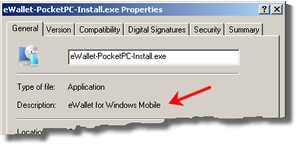
I’d never given much thought to the program properties of the installation files we make - I know that checking them for correct descriptions, version numbers and digital signatures is a part of our QA process, but pretty much had that in the “necessary evil” thought pile, or maybe even the “unnecessary overhead” one. But trying to figure out what installation files went with what programs on my PC made clear to me the value of that info. I didn’t have that many installation files that I wasn’t able to identify without running them, but the ones I had were pretty irritating (and I wasn’t in the best mood to start, given that my PC wasn’t booting well, or writing CDs).
Anyway, it’s nice to see that following the rules does have a point, at least once in a while.
 It’s semi-official! Windows Mobile 6 (aka Crossbow) is here (sort of)! The good news is that all the latest versions of Ilium Software’s products are 100% compatible with the new versions of the OS. We’ve been working with Crossbow for a few months now and tested all of our latest releases. From eWallet and ListPro to NewsBreak, Keep Track, and DockWare Pro, your apps will continue to work great on your 6.0 devices.
 We’ve all found them. Little tricks, tweaks, and techniques that make our favorite programs even better. I received an email recently from KS recently suggesting that we do a blog post where we ask all of you to share your favorite eWallet tricks.
 Well, the month of January is over, and it’s time to announce the first winner of our
 One of the toughest things to do as a (relatively) small software developer is to get the word out about your product. We don’t have a multi-million dollar ad budget or a marketing department filled with people thinking up clever new ways to let people know how badly they need our software. At the same time we have some great products that people get really hooked on once they start using them.